Showing posts with label NAV. Show all posts

Wednesday, August 28, 2019

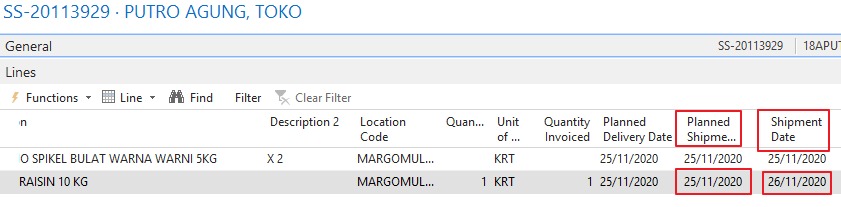
(2016) Can we determine original "Sales Line"."Shipment Date" after Sales Order got fully posted ?

from Planned Shipment Date Field [on Sales Shipment Line table] :
The program copies the contents of this field from the Planned Shipment Date field in the Sales Line table.

and from dates relate to sales order :
Shipment Date + Outbound Whse. Handling Time = Planned Shipment Date
* Outbound Whse. Handling Time can be found on Location card

we can conclude that user inputted (original) "Shipment Date" can be determined by substracting Outbound Whse. Handling Time from "Sales Shipment Line"."Planned Shipment Date"


Terkait :
Penjelasan tentang tanggal-tanggal yang ada di Sales Order.

UPDATE
Bila log modification utk [Sales Line].[Shipment Date] aktif, paling gampang ya lihat Change Log !


Monday, July 29, 2019

Costing method related

Costing Method Best Practices for Dynamics NAV AUGUST 21, 2017
Average :
Note: This method is typically not recommended due to the difficulty of traceability and complication of correction if data entry errors are made.
...
The costing methods above are used for valuing inventory on the balance sheet. 
NAV also calculates and displays the average cost on the item card, regardless of which costing method is used for inventory valuation
This average cost can be used for other reports such as sales analysis or commissions calculation.

Inventory costing Methods , which is good ?

Friday, April 26, 2019

VAT related

Changing "Price Including VAT" on header - will it alter Unit Price on Lines ?
Yes if you use non-zero VAT percent on the line

Sunday, April 7, 2019

Workflow related

NAV 2016 - Workflow problem (table locked) when send multiple approval requests at the same time
Actually, I’d already solved this by using job queue to handle the requests.
How ? Are there any disadvantages ?

Workflow gets stuck
restart nav service

Related
---------
How to find the query that is still holding a lock?

Tuesday, October 11, 2016

v4.0 (all SP) related

User(s) suddenly getting a lot of permission error though no changes have been made to the permission setup :
Perform Security \ Synchronize

Tuesday, August 9, 2016

Posting Group related

NAV Posting Groups
the Header will always hold information for WHO and the Lines for WHAT

Tuesday, July 26, 2016

Sales Price related

For item with variants, can we setup one generic sales price for all variants ?
YES, just leave variant code column blank

Which date on source document is used to select applicable price lines ?
See codeunit 7000 Sales Price Calc. Mgt. func SalesHeaderStartDate:
IF "Document Type" IN ["Document Type"::Invoice,"Document Type"::"Credit Memo"] THEN BEGIN
    DateCaption := FIELDCAPTION("Posting Date");
    EXIT("Posting Date")
  END ELSE BEGIN
    DateCaption := FIELDCAPTION("Order Date");
    EXIT("Order Date");
  END;

----- PINDAH KE ONE NOTE ------

Monday, September 14, 2015

Determine if a G/L entry is a result of direct posting (or not)

Scenario:
Why is Gross Profit from Account Schedule Overview is significantly different than Profit from OLAP ?

Steps to investigate:
Make sure that Nett Sales figures from both sources are the same
In most cases, CoGS figures are different
CoGS on Acc. Shed. Overview is sum of balances of accounts number 420000..429999
Filter on G/L Entries table for accounts in that range AND System-Created Entry=No
Entries shown are the ones came from direct-posting

Other thing to consider:
(1)
If Adjust Cost Item Entries batch is still running while OLAP processing is also running, the resulted pivot in Excel may NOT show correct/final Cost Amount (and Profit)
To find out, perform this query on Business Analytics database:

SELECT  MAX(EntryNo_) AS Expr1 FROM  wLedgerEntryDimensionValueEntry

and compare the result with last entry created by ACIE batch (Source Code=INVTADJMT).


(2)
OLAP processing failed?

Tuesday, May 26, 2015

Fitur "Invoice Discount" (Indonesian)

Artinya, diskon global utk 1 Sales Order

Dari Online Help untuk field "Invoice Disc. Code" yang ada di Customer Card:


This field displays the customer's invoice discount code. You can enter a maximum of 20 characters, both numbers and letters.
When you set up a new customer card, the number from the No. field is automatically copied to this field.
You then have two possibilities in this field:
  • If you want the customer to have an individual invoice discount, don't change the contents of this field, but set up terms for this invoice discount code in the Cust. Invoice Disc. window. To see the window, click the Sales button on the Customer Card window, and select Invoice Discount.
  • If you want several customers to have the same invoice discount, you can replace the default code with another one. This can be a code that has previously been set up, or it can be a new one. If you enter a new code, you must set up invoice discount terms for it in the Cust. Invoice Disc. window. After this, enter the new code in the Invoice Disc. Code field for each customer that you want to have the same invoice discount.
Use codes that are easy to remember and describe the invoice discount terms. For example:
20000 (the customer must buy at least LCY 20,000 worth of merchandise before the invoice discount is granted).
The invoice discount can be allowed/disallowed in the Price Groups window.

Monday, January 5, 2015

General Journal posting error "There is no .. ledger entry within the filter .."

A document number is refered to (on "Applies-to Doc" column) more than once

Sunday, August 10, 2014

Selalu muncul popup stok tidak cukup saat input SO padahal "Item Availibility" cukup

Salah satu tambahan code di bawah ini akan memudahkan penelusuran:

Codeunit 5790 Available to Promise:
di function QtyAvailabletoPromise:
IF (UPPERCASE(USERID)='YOURNAME') THEN
MESSAGE('%1**%2**%3**%4',Item.Inventory,Item."Reserved Qty. on Inventory", ScheduledReceipt,GrossRequirement);

ATAU, di function CalcGrossRequirement:

IF (UPPERCASE(USERID)='YOURNAME') THEN BEGIN
MESSAGE('%1**%2',Item."Scheduled Need (Qty.)",Item."Res. Qty. on Prod. Order Comp.");
MESSAGE('%1**%2**%3',Item."Planning Issues (Qty.)",Item."Qty. on Sales Order",Item."Reserved Qty. on Sales Orders");
MESSAGE('%1**%2**%3',Item."Trans. Ord. Shipment (Qty.)",Item."Res. Qty. on Outbound Transfer", QtyOnPurchReturn);

Yang pernah terjadi adalah banyak PRO outstanding dimana hal tsb tidak diperhitungkan (tidak tampak) bila dilihat dari menu/form "Item Availibility"

Related
--------
Rumus utk kolom "Projected Available Balance" di report "Item Availibility":

Inventory + PlannedOrderReceipt + ScheduledReceipt - GrossRequirement
    = Planning Receipt (Qty.) +   = ("Scheduled Receipt (Qty.)" - "Reserved Qty. on Prod. Order") +   = ("Scheduled Need (Qty.)" - "Res. Qty. on Prod. Order Comp.") +
    Planned Order Receipt (Qty.) +   ( Purch. Req. Receipt (Qty.) - "Res. Qty. on Req. Line") +   Planning Issues (Qty.) +
    Purch. Req. Receipt (Qty.)   ("Qty. on Purch. Order" - "Reserved Qty. on Purch. Orders") +   ("Qty. on Sales Order" - "Reserved Qty. on Sales Orders") +
        ("Trans. Ord. Receipt (Qty.)" - "Res. Qty. on Inbound Transfer") +   ("Qty. on Service Order" - "Res. Qty. on Service Orders") +
        "Qty. in Transit" +   ("Trans. Ord. Shipment (Qty.)" - "Res. Qty. on Outbound Transfer") +
        QtyOnSalesReturn   QtyOnPurchReturn
Qty. on Purch. Order Sum("Purchase Line"."Outstanding Qty. (Base)" WHERE (Document Type=CONST(Order),Type=CONST(Item),No.=FIELD(No.),Shortcut Dimension 1 Code=FIELD(Global Dimension 1 Filter),Shortcut Dimension 2 Code=FIELD(Global Dimension 2 Filter),Location Code=FIELD(Location Filter),Drop Shipment=FIELD(Drop Shipment Filter),Variant Code=FIELD(Variant Filter),Expected Receipt Date=FIELD(Date Filter)))
Reserved Qty. on Purch. Orders Sum("Reservation Entry"."Quantity (Base)" WHERE (Item No.=FIELD(No.),Source Type=CONST(39),Source Subtype=CONST(1),Reservation Status=CONST(Reservation),Location Code=FIELD(Location Filter),Variant Code=FIELD(Variant Filter),Expected Receipt Date=FIELD(Date Filter)))
Res. Qty. on Outbound Transfer -Sum("Reservation Entry"."Quantity (Base)" WHERE (Item No.=FIELD(No.),Source Type=CONST(5741),Source Subtype=CONST(0),Reservation Status=CONST(Reservation),Location Code=FIELD(Location Filter),Variant Code=FIELD(Variant Filter),Shipment Date=FIELD(Date Filter)))
Scheduled Receipt (Qty.) Sum("Prod. Order Line"."Remaining Qty. (Base)" WHERE (Status=FILTER(Planned..Released),Item No.=FIELD(No.),Variant Code=FIELD(Variant Filter),Shortcut Dimension 1 Code=FIELD(Global Dimension 1 Filter),Shortcut Dimension 2 Code=FIELD(Global Dimension 2 Filter),Location Code=FIELD(Location Filter),Due Date=FIELD(Date Filter)))
Scheduled Need (Qty.) Sum("Prod. Order Component"."Remaining Qty. (Base)" WHERE (Status=FILTER(Planned..Released),Item No.=FIELD(No.),Variant Code=FIELD(Variant Filter),Shortcut Dimension 1 Code=FIELD(Global Dimension 1 Filter),Shortcut Dimension 2 Code=FIELD(Global Dimension 2 Filter),Location Code=FIELD(Location Filter),Due Date=FIELD(Date Filter)))
Reserved Qty. on Prod. Order Sum("Reservation Entry"."Quantity (Base)" WHERE (Item No.=FIELD(No.),Source Type=CONST(5406),Source Subtype=FILTER(1..3),Reservation Status=CONST(Reservation),Location Code=FIELD(Location Filter),Variant Code=FIELD(Variant Filter),Expected Receipt Date=FIELD(Date Filter)))
Res. Qty. on Prod. Order Comp. -Sum("Reservation Entry"."Quantity (Base)" WHERE (Item No.=FIELD(No.),Source Type=CONST(5407),Source Subtype=FILTER(1..3),Reservation Status=CONST(Reservation),Location Code=FIELD(Location Filter),Variant Code=FIELD(Variant Filter),Shipment Date=FIELD(Date Filter)))
Res. Qty. on Req. Line Sum("Reservation Entry"."Quantity (Base)" WHERE (Item No.=FIELD(No.),Source Type=CONST(246),Source Subtype=FILTER(0),Reservation Status=CONST(Reservation),Location Code=FIELD(Location Filter),Variant Code=FIELD(Variant Filter),Expected Receipt Date=FIELD(Date Filter)))
Qty. in Transit Sum("Transfer Line"."Qty. in Transit (Base)" WHERE (Derived From Line No.=CONST(0),Item No.=FIELD(No.),Transfer-to Code=FIELD(Location Filter),Variant Code=FIELD(Variant Filter),Shortcut Dimension 1 Code=FIELD(Global Dimension 1 Filter),Shortcut Dimension 2 Code=FIELD(Global Dimension 2 Filter),Receipt Date=FIELD(Date Filter)))
Trans. Ord. Receipt (Qty.) Sum("Transfer Line"."Outstanding Qty. (Base)" WHERE (Derived From Line No.=CONST(0),Item No.=FIELD(No.),Transfer-to Code=FIELD(Location Filter),Variant Code=FIELD(Variant Filter),Shortcut Dimension 1 Code=FIELD(Global Dimension 1 Filter),Shortcut Dimension 2 Code=FIELD(Global Dimension 2 Filter),Receipt Date=FIELD(Date Filter)))
Planning Issues (Qty.) Sum("Planning Component"."Expected Quantity (Base)" WHERE (Item No.=FIELD(No.),Due Date=FIELD(Date Filter),Location Code=FIELD(Location Filter),Variant Code=FIELD(Variant Filter),Shortcut Dimension 1 Code=FIELD(Global Dimension 1 Filter),Shortcut Dimension 2 Code=FIELD(Global Dimension 2 Filter),Planning Line Origin=CONST(" ")))
Planning Receipt (Qty.) Sum("Requisition Line"."Quantity (Base)" WHERE (Type=CONST(Item),No.=FIELD(No.),Due Date=FIELD(Date Filter),Location Code=FIELD(Location Filter),Variant Code=FIELD(Variant Filter),Shortcut Dimension 1 Code=FIELD(Global Dimension 1 Filter),Shortcut Dimension 2 Code=FIELD(Global Dimension 2 Filter)))
Planned Order Receipt (Qty.) Sum("Prod. Order Line"."Remaining Qty. (Base)" WHERE (Status=CONST(Planned),Item No.=FIELD(No.),Variant Code=FIELD(Variant Filter),Shortcut Dimension 1 Code=FIELD(Global Dimension 1 Filter),Shortcut Dimension 2 Code=FIELD(Global Dimension 2 Filter),Location Code=FIELD(Location Filter),Due Date=FIELD(Date Filter)))
Purch. Req. Receipt (Qty.) Sum("Requisition Line"."Quantity (Base)" WHERE (Type=CONST(Item),No.=FIELD(No.),Variant Code=FIELD(Variant Filter),Location Code=FIELD(Location Filter),Shortcut Dimension 1 Code=FIELD(Global Dimension 1 Filter),Shortcut Dimension 2 Code=FIELD(Global Dimension 2 Filter),Due Date=FIELD(Date Filter),Planning Line Origin=CONST(" ")))
Reserved Qty. on Inventory Sum("Reservation Entry"."Quantity (Base)" WHERE (Item No.=FIELD(No.),Source Type=CONST(32),Source Subtype=CONST(0),Reservation Status=CONST(Reservation),Serial No.=FIELD(Serial No. Filter),Lot No.=FIELD(Lot No. Filter),Location Code=FIELD(Location Filter),Variant Code=FIELD(Variant Filter)))
// Qty. on Sales Return
WITH SalesLine DO BEGIN
  SETCURRENTKEY("Document Type",Type,"No.","Variant Code","Drop Shipment","Location Code","Shipment Date");
  SETRANGE("Document Type","Document Type"::"Return Order");
  SETRANGE(Type,Type::Item);
  SETRANGE("No.",Item."No.");
  SETFILTER("Location Code",Item.GETFILTER("Location Filter"));
  SETFILTER("Drop Shipment",Item.GETFILTER("Drop Shipment Filter"));
  SETFILTER("Variant Code",Item.GETFILTER("Variant Filter"));
  SETRANGE("Shipment Date",Item.GETRANGEMIN(Item."Date Filter"),Item.GETRANGEMAX(Item."Date Filter"));
  CALCSUMS("Outstanding Qty. (Base)");
  QtyOnSalesReturn := "Outstanding Qty. (Base)";
  RESET;
END;
WITH ReservationEntry DO BEGIN
  SETCURRENTKEY(
    "Item No.","Source Type","Source Subtype","Reservation Status",
    "Location Code","Variant Code","Shipment Date","Expected Receipt Date");
  SETRANGE("Item No.",Item."No.");
  SETRANGE("Source Type",DATABASE::"Sales Line");
  SETRANGE("Source Subtype",5);
  SETRANGE("Reservation Status","Reservation Status"::Reservation);
  SETFILTER("Location Code",Item.GETFILTER("Location Filter"));
  SETFILTER("Variant Code",Item.GETFILTER("Variant Filter"));
  SETRANGE("Shipment Date",Item.GETRANGEMIN(Item."Date Filter"),Item.GETRANGEMAX(Item."Date Filter"));
  CALCSUMS("Quantity (Base)");
  QtyOnSalesReturn -= "Quantity (Base)";
  RESET;
END;
// Qty. on Purchase Return
WITH PurchLine DO BEGIN
  SETCURRENTKEY("Document Type",Type,"No.","Variant Code","Drop Shipment","Location Code","Expected Receipt Date");
  SETRANGE("Document Type","Document Type"::"Return Order");
  SETRANGE(Type,Type::Item);
  SETRANGE("No.",Item."No.");
  SETFILTER("Location Code",Item.GETFILTER("Location Filter"));
  SETFILTER("Drop Shipment",Item.GETFILTER("Drop Shipment Filter"));
  SETFILTER("Variant Code",Item.GETFILTER("Variant Filter"));
  SETRANGE("Expected Receipt Date",Item.GETRANGEMIN(Item."Date Filter"),Item.GETRANGEMAX(Item."Date Filter"));
  CALCSUMS("Outstanding Qty. (Base)");
  QtyOnPurchReturn := "Outstanding Qty. (Base)";
  RESET;
END;
WITH ReservationEntry DO BEGIN
  SETCURRENTKEY(
    "Item No.","Source Type","Source Subtype","Reservation Status",
    "Location Code","Variant Code","Shipment Date","Expected Receipt Date");
  SETRANGE("Item No.",Item."No.");
  SETRANGE("Source Type",DATABASE::"Purchase Line");
  SETRANGE("Source Subtype",5);
  SETRANGE("Reservation Status","Reservation Status"::Reservation);
  SETFILTER("Location Code",Item.GETFILTER("Location Filter"));
  SETFILTER("Variant Code",Item.GETFILTER("Variant Filter"));
  SETRANGE("Expected Receipt Date",Item.GETRANGEMIN(Item."Date Filter"),Item.GETRANGEMAX(Item."Date Filter"));
  CALCSUMS("Quantity (Base)");
  QtyOnPurchReturn += "Quantity (Base)";
  RESET;
END;

Thursday, May 8, 2014

Import table Item

Item Master Data Import
with automatically create "Item Unit of Measure" record for Base UoM

Tuesday, March 18, 2014

Filtering on temp table

SETSELECTIONFILTER in temporary records
Regular record variables are looking at the actual table, so you can take the filter from one variable, copy them to another variable, and you get the same results, because the variable goes to the table and retrieves records from the physical table. No brainer right. You'd think that the same applies to temporary records right? Well that's where you are wrong, because temporary records don't have any values in them when you instantiate them, so when you fill only one of them, set filters, and copy the filters to the other one, it comes as no surprise that there are no values in there, BECAUSE IT DOESNT HAVE ANY VALUES.

You have a temporary record variable, which is empty when it is instantiated. You fill it up. Now it has records, temporary records that only exist in this memory space that is occupied by this single record variable. Now you apply a filter on this set of records. Now you want to apply the same filter to another temporary record, but you are surprised that you don't see anything in the other one. The other one hasn't been filed yet, it is uninstantiated!!! The second variable doesn't just read from the first variable, you have to actually put the records into the variable.

Think of a temporary record variable as a collection of objects. Rec (the temporary record variable that your form is based on) and NewRec (which is a global or local variable somewhere in your logic) are two different collections. One of them has been filled, but the other one has not been filled. The selectionfilter from Rec is properly applied to NewRec, but since there is nothing in there, you don't see anything.

Lookup form on temp table

FORM.RunModal(FormID, MyRecord) vs MyForm.RunModal
For showing temporary records, my observation is that:
- FORM.RUNMODAL will allow a temporary record to show up correctly, but
- MyForm.RUNMODAL will only show the main table even if SETTABLEVIEW is issued with the temporary rec as the variable.
...
but this raises another issue to watch for: if the form identified by FormID is a tabular form with the LOOKUPMODE property set to FALSE and EDITABLE to Yes (look at F100 Accounting Periods, for instance, compare with F89 Job List), then you would need to either change the Form properties LOOKUPMODE to Yes and EDITABLE to No (bad idea! this is an invitation to problems due to unforeseen side-effects), or better yet, create a copy of the form in which the properties are set as appropriate for a Lookup Form and use that form instead.

Monday, February 3, 2014

Usage of NextControl property to speed up data entry

I have a customer who wants the following in Sales lines:

After entering the Quantity he wants teh system to automatically jump to the next line and lands on the "No." field to enter another Item number if available.

Any ideas on how to do that??

Just change the NextControl on the columns. So Control 1 will jump to Control 3, Control 3 will jump to Control 1.

set the NextControl of the QTY field to the ID of the No. field

source:
How to jump to the Next Line in Sales Lines?

Remove tabs (pages) from form

don't even touch the pages propertybefore you move the fields around.

Say you have General, Foreign Trade, Item Tracking (Not looking at NAV right now) and you want to remove the Foreign Trade tab.

Here is a step by step approach:
1: remove the fields from the Foreign Trade tab

2: Move all fields from the Item Tracking tab to the Foreign Trade Tab, so that the Item Tracking tab is empty. If you have more tabs behind that, you have to move all fields for each tab to the empty tab on the left. Don't worry that they are on the wrong tab now, you will fix this in the next step

3: click the empty space in the upper right corner of the tab control, right where a new tab would go. This should select the tab control

4: open the properties page and browse to the Pages property. NOW you can remove the Foreign Trade from the tabs.

5: close the properties page, save the form, close the form, open the form. Your fields should now all be on the right tabs, and the Foreign Trade tab should be gone

source:
how to remove tabs in a tabular form

Thursday, November 28, 2013

2013: Sample of SetData (Report 207)

1 Cstr(Fields!CustAddr1.Value) + Chr(177)
2 Cstr(Fields!CustAddr2.Value) + Chr(177)
3 Cstr(Fields!CustAddr3.Value) + Chr(177)
4 Cstr(Fields!CustAddr4.Value) + Chr(177)
5 Cstr(Fields!CustAddr5.Value) + Chr(177)
6 Cstr(Fields!CustAddr6.Value) + Chr(177)
7 Cstr(Fields!CustAddr7.Value) + Chr(177)
8 Cstr(Fields!CustAddr8.Value) + Chr(177)
9 Cstr(Fields!CompAddr1.Value) + Chr(177)
10 Cstr(Fields!CompAddr2.Value) + Chr(177)
11 Cstr(Fields!CompAddr3.Value) + Chr(177)
12 Cstr(Fields!CompAddr4.Value) + Chr(177)
13 Cstr(Fields!CompAddr5.Value) + Chr(177)
14 Cstr(Fields!CompAddr6.Value) + Chr(177)
15 Cstr(Fields!BilltoCustNo_SalesCrMemoHdr.Value) + Chr(177)
16 Cstr(Fields!VATRegNo_SalesCrMemoHdr.Value) + Chr(177)
17 Cstr(Fields!SalesPurchPersonName.Value) + Chr(177)
18 Cstr(Fields!YourRef_SalesCrMemoHdr.Value) + Chr(177)
19 Cstr(Fields!PostingDate_SalesCrMemoHdr.Value) + Chr(177)
20 Cstr(Fields!AppliedToText.Value) + Chr(177)
21 Cstr(Fields!No1_SalesCrMemoHdr.Value) + Chr(177)
22 Cstr(Fields!RetrnOrdNo_SalesCrMemoHrd.Value) + Chr(177)
23 Cstr(Fields!DocDate_SalesCrMemoHdr.Value) + Chr(177)
24 Cstr(Fields!OriginalInvDt.Value) + Chr(177)
25 Cstr(Fields!AppliedToText.Value) + Chr(177)
26 Cstr(Fields!ReasonCode_SalesCrMemoHdr.Value) + Chr(177)
27 Cstr(Fields!PricesInclVAT_SalesCrMemoHdr.Value) + Chr(177)
28 Cstr(Fields!DocumentCaptionCopyText.Value) + Chr(177)
29 Cstr(Fields!CompanyInfoPhoneNo.Value) + Chr(177)
30 Cstr(Fields!CompanyInfoHomePage.Value) + Chr(177)
31 Cstr(Fields!CompanyInfoEmail.Value) + Chr(177)
32 Cstr(Fields!CompanyInfoVATRegsNo.Value) + Chr(177)
33 Cstr(Fields!CompanyInfoGiroNo.Value) + Chr(177)
34 Cstr(Fields!CompanyInfoBankName.Value) + Chr(177)
35 Cstr(Fields!CompanyInfoBankAccountNo.Value) + Chr(177)
36 Cstr(Fields!CompanyInfoABN.Value) + Chr(177)
37 Cstr(Fields!CompanyInfoABNDivisionPartNo.Value) + Chr(177)
38 Cstr(Fields!DivPartNoCaption.Value) + Chr(177)
39 Cstr(Fields!PrsInclVAT_SalesCrMemoHrdCaption.Value) + Chr(177)
40 Cstr(Fields!PostingDateCaption.Value) + Chr(177)
41 Cstr(Fields!CrMemoNoCaption.Value) + Chr(177)
42 Cstr(Fields!ReturnOrderNoText.Value) + Chr(177)
43 Cstr(Fields!BilltoCustNo_SalesCrMemoHdrCaption.Value) + Chr(177)
44 Cstr(Fields!RefText.Value) + Chr(177)
45 Cstr(Fields!SalesPersonText.Value) + Chr(177)
46 Cstr(Fields!VATNoText.Value) + Chr(177)
47 Cstr(Fields!BankAccountNoCaption.Value) + Chr(177)
48 Cstr(Fields!BankNameCaption.Value) + Chr(177)
49 Cstr(Fields!GiroNoCaption.Value) + Chr(177)
50 Cstr(Fields!VATRegNoCaption.Value) + Chr(177)
51 Cstr(Fields!HomePageCaption.Value) + Chr(177)
52 Cstr(Fields!PhoneNoCaption.Value) + Chr(177)
53 Cstr(Fields!PageCaption.Value) + Chr(177)
54 Cstr(Fields!EmailIdCaption.Value) + Chr(177)
55 Cstr(Fields!DocDateCaption.Value) + Chr(177)
56 Cstr(Fields!ABNCaption.Value) + Chr(177)
57 Cstr(Fields!OriginalInvoiceDateCaption.Value) + Chr(177)
58 Cstr(Fields!OriginalInvoiceNoCaption.Value) + Chr(177)
59 Cstr(Fields!ReasonCodeCaption.Value)